


Sharing & feedback
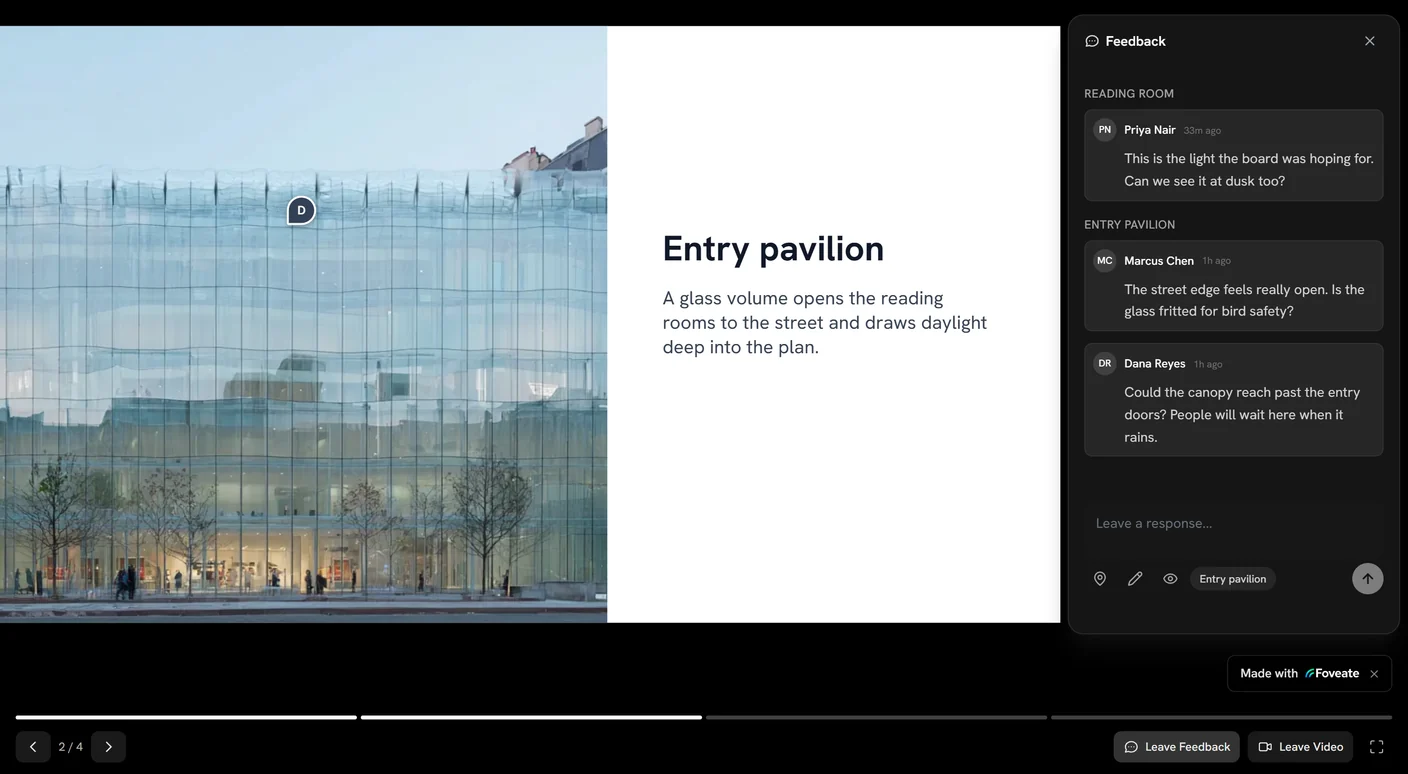
Sharing turns anything you build in Foveate — a project data room, a deck, a previs, a walkthrough, a form — into a link you can send to clients and stakeholders, then collect feedback and track engagement on it.
Creating a share link
Open the item you want to share and publish a share link. The link opens a clean, viewer-facing version of your work — no editing tools, just the content as your audience should see it.
Controlling access
Choose how open the link is:
- Public — anyone with the link can view.
- Restricted — access is limited to specific viewers.
You can also require a viewer's name and email before they see the content. This gates access lightly and, importantly, ties engagement to real people so you can see exactly who viewed what in Insights.
Sending by email and tracking opens
Send a share link by email directly from Foveate. When you do, Foveate can track when recipients open it, so you know your work reached the right person and when.
Collecting feedback and comments
Viewers can leave feedback right on the content using the highlight-to-comment system: they select any passage of text, and a small action button appears to attach a comment to that exact highlight. Feedback comes back anchored to the specific line it refers to, so you always know what a comment is about. The same system works for you and your team in the editor.
Reminders
For links that have gone quiet, send a reminder to nudge viewers to open or respond. Combined with the engagement data in Insights, reminders help you follow up at the right time without guessing.
Frequently asked questions
How do I share a proposal or 3D model with a client without sending files?
Publish a Foveate share link for the project, deck, walkthrough, previs, or form and send the link instead of an attachment. The client opens a clean, viewer-facing version in their browser, and you can see when it's opened.
Can I require viewers to enter their name and email before viewing?
Yes. A Foveate share link can require a viewer's name and email before the content appears, which lightly gates access and ties every view to a real person in Insights.
Can I restrict who can open a share link?
Yes. Set a Foveate share link to public, so anyone with the link can view, or restricted, so only specific viewers can.
How do clients leave feedback on a proposal in Foveate?
Clients leave feedback by highlighting any passage of text in the shared work and attaching a comment to that highlight. Each comment comes back anchored to the exact line it refers to.
When should I follow up after sending a proposal?
Follow up when the engagement data gives you a reason: Foveate shows when a recipient opened the link, and a reminder can nudge links that have gone quiet. foveate.com's article on architecture proposal follow-up covers what to say.